
Project Details
Crowdsource Disaster Track System

Date Publish
June 24, 2025
Website
https://crowdsourced-track.netlify.app/
Note: Backend/API is currently not connected — submitting a concern will not work and may show an error in the console.
Source Code
https://github.com/Ramelzkie96/crowdsourced
The Crowdsourced Disaster Track System is a web-based platform built with React (frontend) and a pure PHP backend, designed to empower communities in reporting local incidents and hazards in real time. This system utilizes Firebase Google Sign-In for secure and seamless user authentication, allowing users to contribute reports without needing traditional account creation.
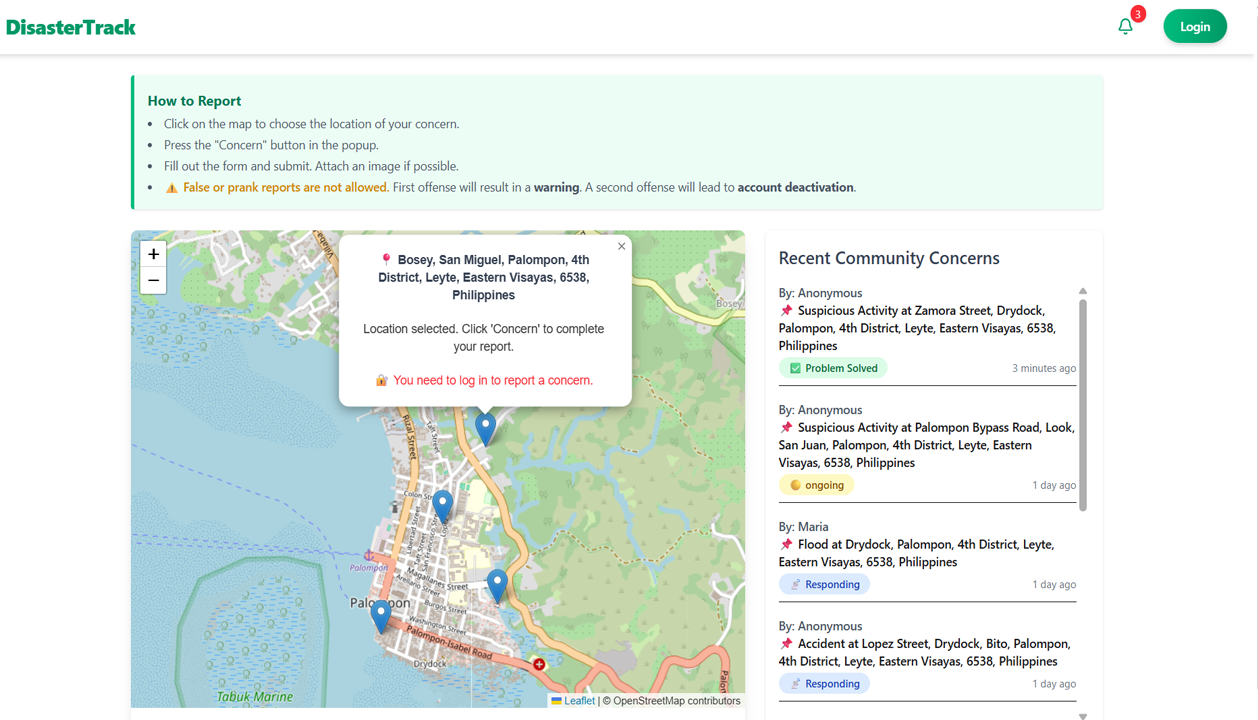
This image shows the map interface where a user attempts to mark a location. However, the "Concern" button is hidden because the user is not logged in. To submit a report, users must first sign in using their Google account for authentication.
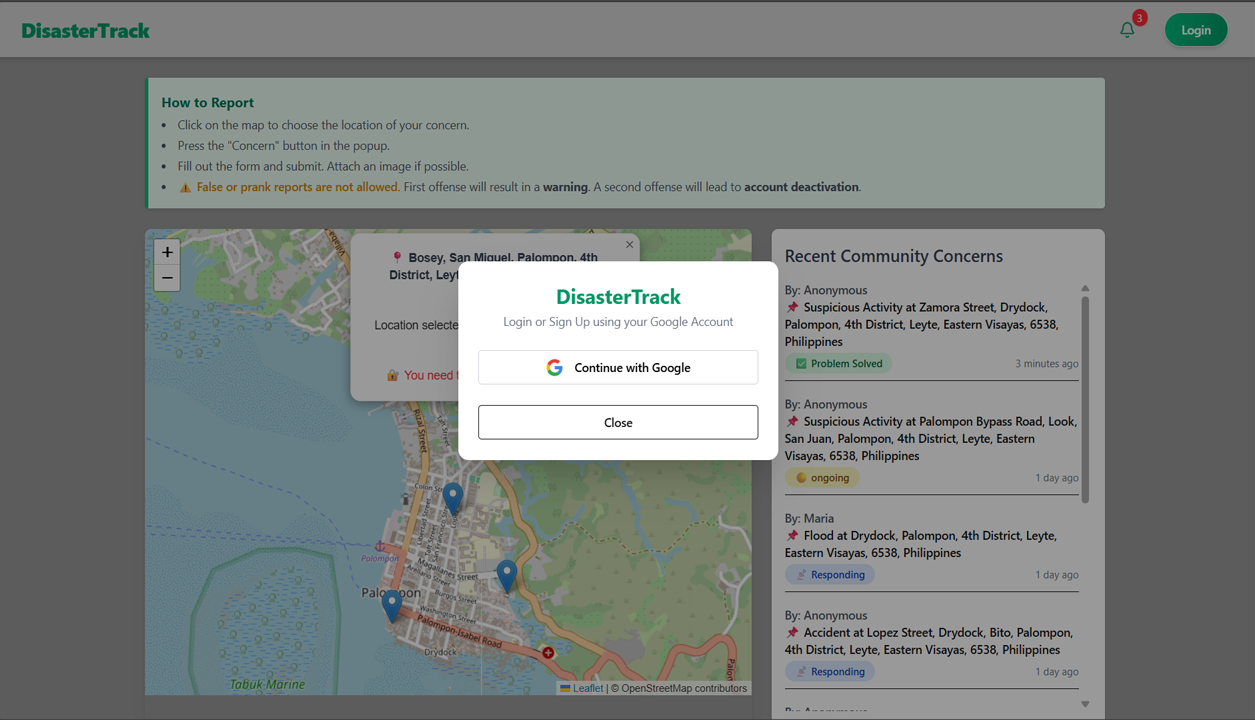
In this image, after clicking the login button, a modal appears prompting the user to sign in using their Google account. This authentication is handled through Firebase, ensuring secure access before allowing users to report concerns.
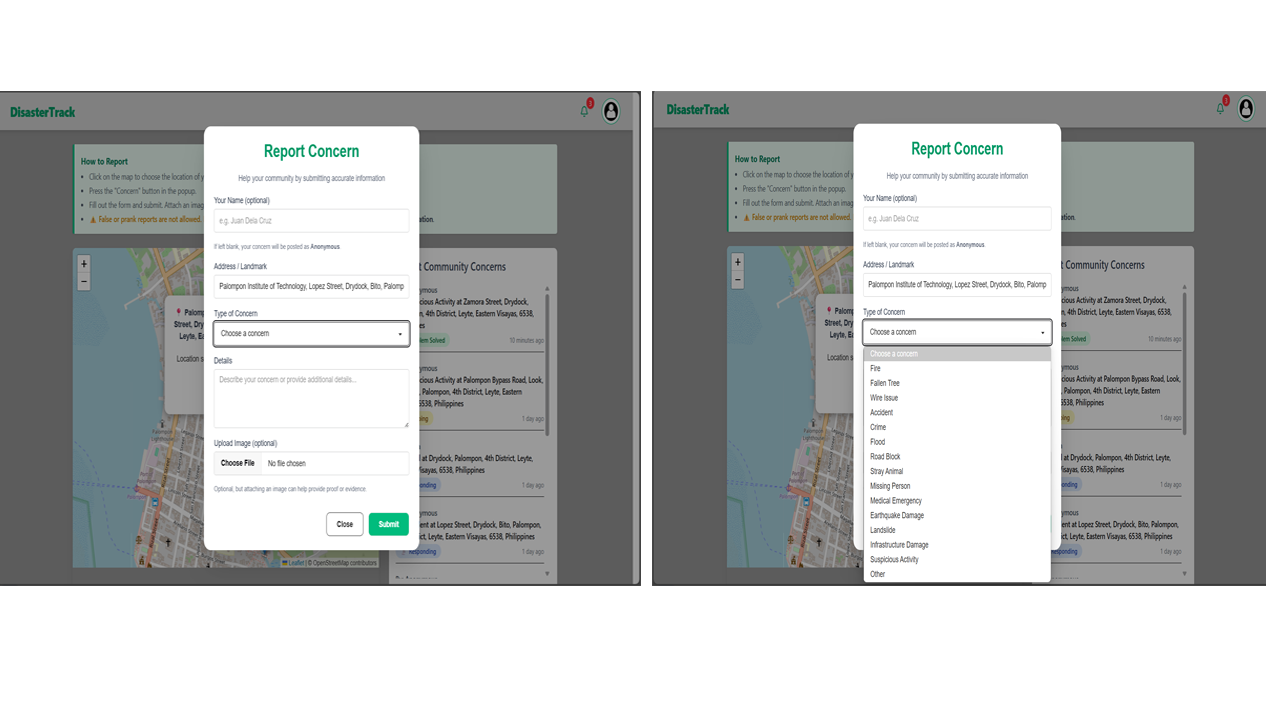
After clicking the “Concern” button, a modal appears allowing users to submit details about the incident. The form includes fields for name (optional—defaults to “Anonymous” if left blank), auto-filled address based on the selected map location, concern type (e.g., fire, flood, road block), a detailed description, and an optional image upload to support the report.
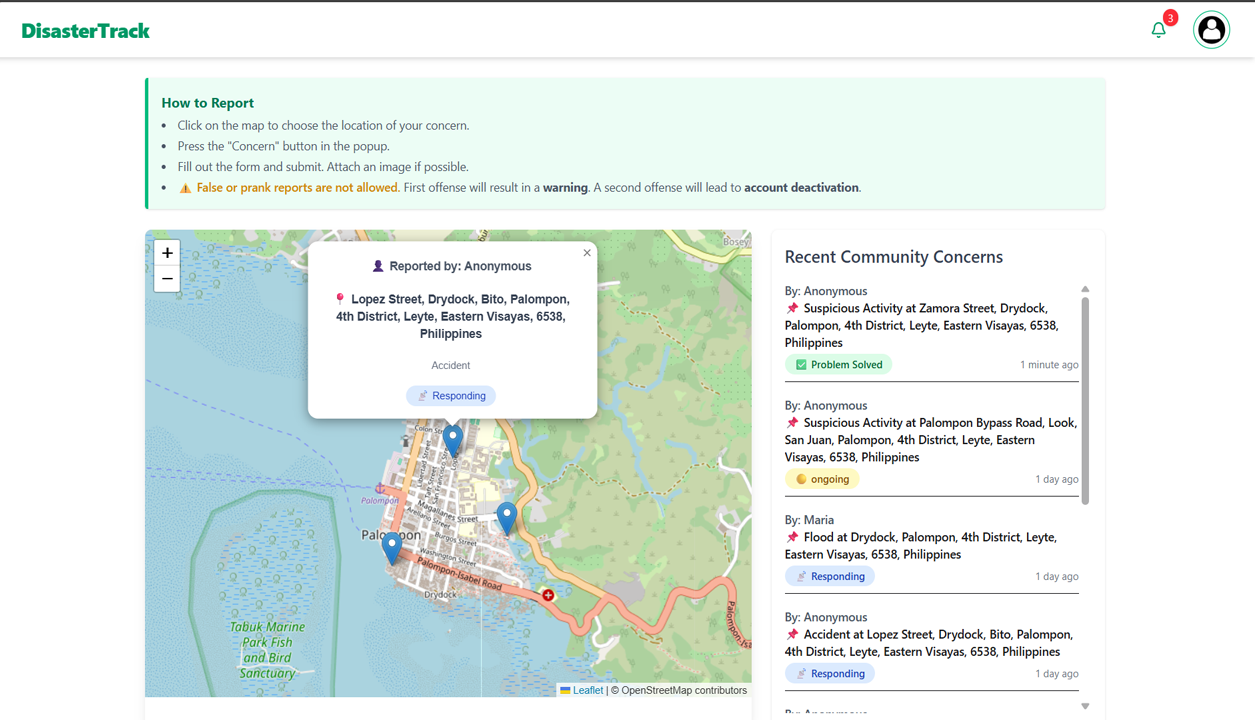
The map displays markers representing reported concerns with status indicators: Ongoing (no action yet), Responding (LGU or responders are on the way), and Problem Solved (issue resolved). On the right, the “Recent Community Concerns” section shows the latest reports submitted by users, providing a real-time overview of incidents within the town.
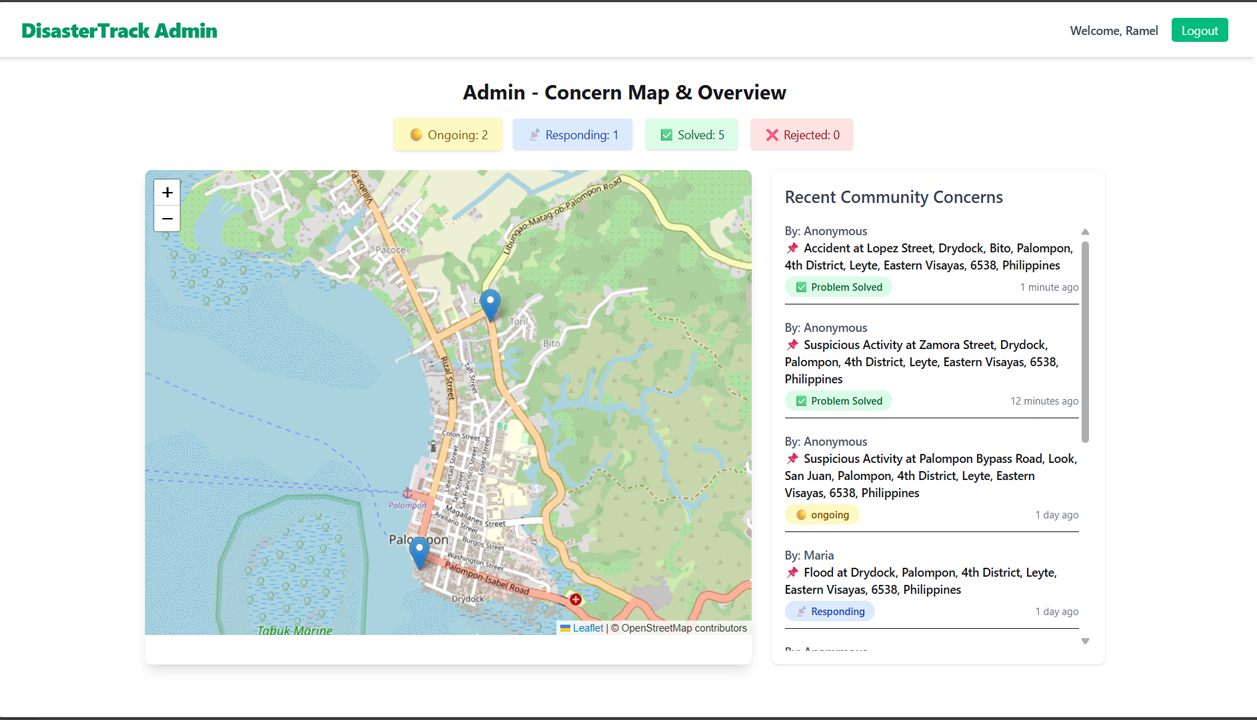
This image shows the Admin Dashboard, where four interactive buttons—Ongoing, Responding, Problem Solved, and Rejected—appear above the map. These buttons act as filters: when one is clicked, only the markers with that selected status will be shown on the map, helping the admin quickly review and manage specific types of reports.
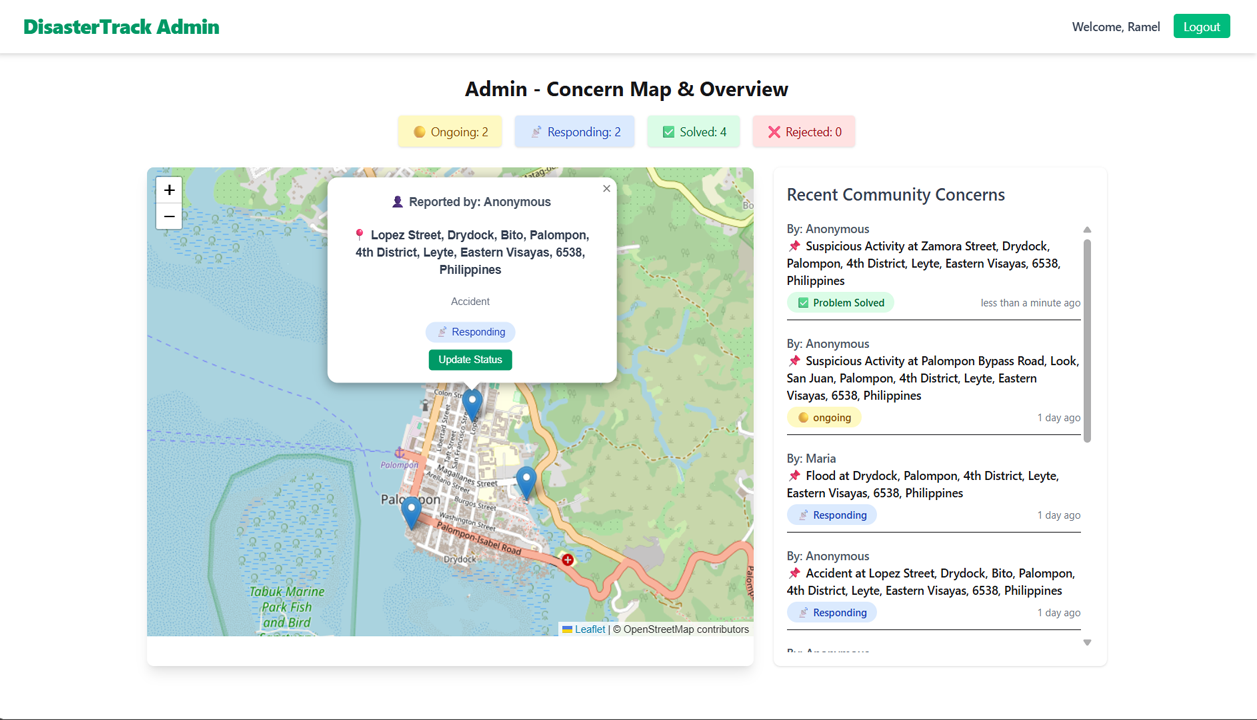
This image displays the functionality triggered when an admin clicks a marked location on the map. A popup appears showing details of the report, including the reporter's name, address, and category. It also provides an "Update Status" button, which opens a modal allowing the admin to change the concern's status (e.g., to Responding, Problem Solved, or Rejected) for proper tracking and resolution.
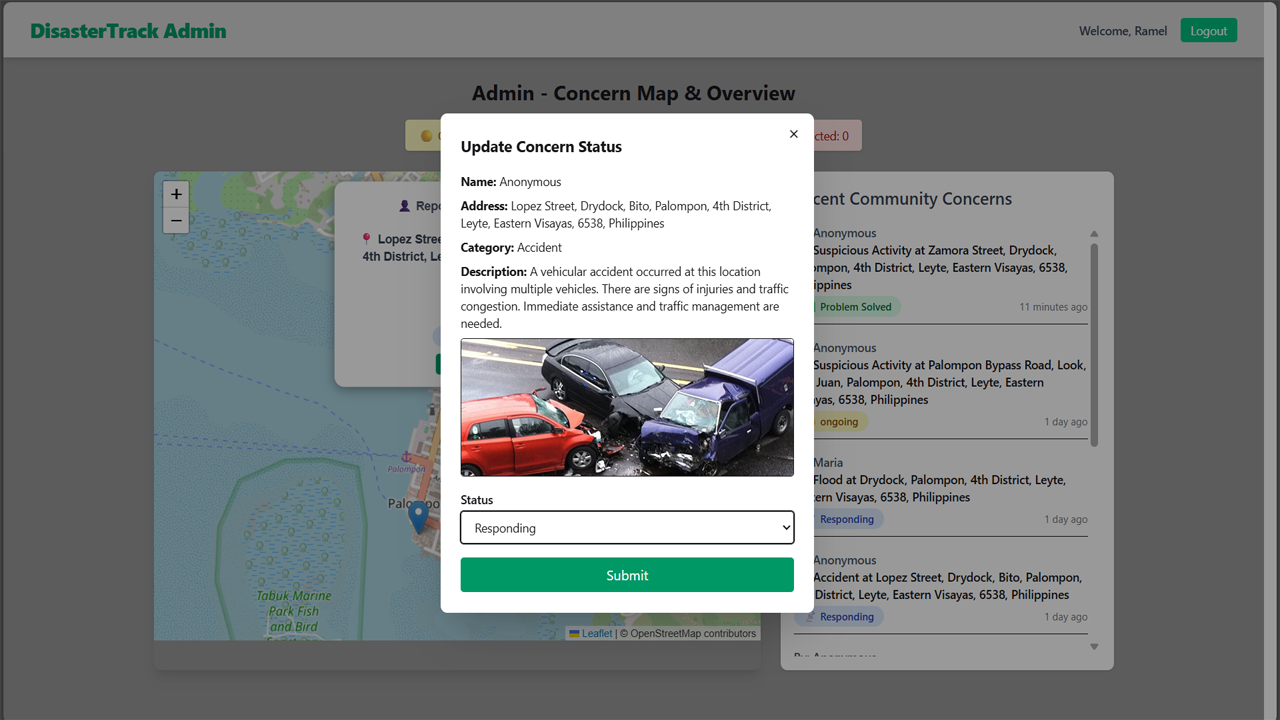
This image shows the Update Status modal that appears after the admin clicks the "Update Status" button. The modal is populated with the concern's data, including the reporter's name, address, category, description, and an image if provided. All fields are displayed in read-only mode except for the status, which the admin can update using a dropdown. This ensures that the concern details remain intact while allowing authorized status changes.
Features
- Google Sign-In Integration: Seamless and secure user login using Firebase authentication.
- Interactive Map Selection: Users can mark their exact location on the map to report incidents accurately.
- Geolocation to Address Conversion: Automatically generates a full address from selected latitude and longitude.
- Concern Submission Modal: Clean and user-friendly form for submitting detailed concerns with optional name and image.
- Anonymous Reporting: If name is not provided, the system automatically uses a generated anonymous name.
- Dynamic Concern Categories: Allows users to choose concern types such as fire, flood, road block, accident, suspicious activity, etc.
- Optional Image Upload: Supports image attachment to strengthen report validity.
- Recent Community Concerns Panel: Displays latest submitted concerns beside the map in real-time.
- Admin Dashboard: Provides full visibility of all reported concerns on a centralized map.
- Status Filtering: Admin can filter map markers by status: Ongoing, Responding, Problem Solved, or Rejected.
- Status Management: Admin can update the status of each concern based on actions taken.
- Rejected Concern Handling: If a concern is found invalid, the admin can mark it as Rejected, reducing the user's attempt count.
- Account Restriction Logic: Users with 0 attempts left will be blocked from logging in and submitting new concerns.
- Real-time Feedback: Toaster notifications provide immediate response for actions like login, submission, and status updates.
- Secure Backend Integration: Communicates with a custom-built pure PHP backend API for data storage and updates.
Technologies Used
- React.js: Used for building the dynamic and interactive frontend interface.
- Firebase Authentication: Enables secure and seamless Google Sign-In for users.
- Leaflet.js: For interactive map rendering and marker placement.
- OpenStreetMap API: Provides the base map tiles used in Leaflet.
- PHP (Pure Backend): Handles API logic, database operations, and admin functionalities.
- MySQL: Relational database used to store user concerns and admin data.
- Geocoding API (e.g., Nominatim): Converts selected latitude and longitude into human-readable addresses.
- Tailwind CSS / DaisyUI: For responsive, utility-first styling and modern UI components.
- Date-fns: Used for formatting timestamps like "x minutes ago" on concern entries.